  |
|
 |
|
 |
The Handbook |
|
Technical Help |
|
Contact Us |
 |
|
 |
|
 |
|
|
The Game Room |
|
Speak Dinosaur |
|
Infinitize Your Computer |


See our special section for America Online users
- When I try to run Castle Infinity,
I get a message that says I need more memory.
- After I've been playing for awhile,
I get a message that says "out of
memory".
- Can I play Castle Infinity without
connecting to the internet?
- When I login, it says someone is
already playing using my Gamename!!
- I managed to get stuck in a wall or
ceiling.
- My S.C.H.T.I.C.K. figure moves even
if I'm not touching the controls!
- I can't read the CD. All I see are
2 directory names.
- How do I get out of My Room?
- Why is Stellacenter in My Room
different than Stellavision?
- I got this horribly weird dialogue box when I tried to start the game!
![[image]](img/faq_spot1.gif) When I try to
run Castle Infinity, I get a message that says I need
more memory.
When I try to
run Castle Infinity, I get a message that says I need
more memory.
![[image]](img/faq_spot2.gif) This
message indicates that Castle Infinity cannot get enough
virtual memory to run on your computer. Virtual memory is
the physical space on your hard drive that Windows 95
uses to pretend there is more memory in your machine. To
fix this problem you can do one or more of the following:
1) Defragment your hard drive; 2) Set your swap space to
a larger size; 3) Get more memory; 4) Empty your recycle
bin to free up disk space; 5) Compress your hard drive to
free up more disk space; or 6) Uninstall or delete
programs you don't use anymore to free up disk space. Of
course, the more free space you have the better. You'll
want to have at least 25 megabytes of disk space
available. 50 megabytes or more would be even better.
This
message indicates that Castle Infinity cannot get enough
virtual memory to run on your computer. Virtual memory is
the physical space on your hard drive that Windows 95
uses to pretend there is more memory in your machine. To
fix this problem you can do one or more of the following:
1) Defragment your hard drive; 2) Set your swap space to
a larger size; 3) Get more memory; 4) Empty your recycle
bin to free up disk space; 5) Compress your hard drive to
free up more disk space; or 6) Uninstall or delete
programs you don't use anymore to free up disk space. Of
course, the more free space you have the better. You'll
want to have at least 25 megabytes of disk space
available. 50 megabytes or more would be even better.
After I've
been playing for awhile, I get a message that says
"out of memory".
There is
a memory leak bug in Windows 95! Windows 95 users who run
Windows Sockets applications continuously over long
periods of time - especially applications which use a
large number of sockets (like Castle Infinity) - will
experience significant resource drain (memory error
messages). This can cause the Windows swapfile to grow
very large, overall deterioration of performance, and
over time, possible system instability. Microsoft has a
fix to this problem. This update resolves a memory leak
which occurs when opening and closing large number of
sockets. Castle Infinity players will benefit from this
update. The update file may be downloaded at: http://www.microsoft.com/windows95/info/krnlupd.htm
Can I play
Castle Infinity without connecting to the internet?
Sure, you
can play by yourself, but that won't be much fun! The
disadvantage of this is that you will not see any other
kids in the game with you, you won't be able to get
through rooms that require a team, and you will not
accumulate or save your scores. We call this "Castle
Infinity Unplugged". Simply start the game with a
"-n" option. The easiest way to do this is to
create a new icon on your desktop. Right click on your
desktop in an area where there are no icons. Select
"New", then "Shortcut". In the
command line, you want to type in the path then the
executable name. If you let the installer install
according to its default settings, you'd enter:
C:\Program Files\Castle
Infinity\Client\INFINITY.EXE -n Then click NEXT then
FINISH. Now you have an icon on your desktop that will
run Castle Infinity Unplugged. note: This will NOT work
with a newly installed game. It must be upgraded to at
least dinobuild 25. You may download the patch from /registration/updates/
When I login,
it says someone is already playing using my Gamename!!
Ouch!
That can be a distressing message. This usually happens
if for some weird reason you were disconnected only
moment before. What is probably happening is that one
moment you were playing and suddenly you were gone, but
Sam and Gail didn't notice that you went away. It might
take up to 5 minutes to see that you're not there
anymore. So just wait a few minutes and try again. If you
still get that nasty message after 10 minutes, the write
Sam & Gail and tell them!! samgail@castleinfinity.com
I managed to
get stuck in a wall or ceiling.
Don't do
that! Oh -- that's right -- you've already done it. To
get out without having to exit the game, bring up
Stellavision and go to the Status & Security screen.
Hit the END or "B" key to go Home. And, in the
future, don't do it again.
My
S.C.H.T.I.C.K. figure moves even if I'm not touching the
controls!
Your
joystick may not be properly installed or calibrated.
Check the installation instructions for your joystick and
make sure it was installed properly. Remember, it's very
important that you turn off and unplug your
computer when you add new hardware like a joystick. Not
doing this can cause unpredictable behavior. To calibrate
your joystick, go to the control panel on your computer
and double click on "joystick". Click the
"calibrate" button and follow the instructions.
If, after you do all that, it is still wacky, turn your
computer off, unplug your computer, and remove the
joystick (unplug it from the back of your computer). Then
plug your computer in and turn it on, and play the game
again without your joystick. Is your
S.C.H.T.I.C.K. still acting weird? If not, then there may
be a problem with your joystick. We suggest you just
leave it off and play using the keyboard until you can
figure out what's wrong with the joystick.
I can't read
the CD. All I see are 2 directory names.
There are
two situations in which this problem will occur: 1)
Running Microsoft Windows NT 3.5; and 2) Using old
drivers for your CD-ROM drive. Solutions to these
problems will soon be available. In the meantime, you can
get around the first problem by upgrading your Windows NT
3.5 to Windows NT 4.0. For the second you'll need to
check with the manufacturer of your CD-ROM drive for an
updated driver. We have a list of hardware
manufacturers that may be of use to you.
To the
left of the S.C.H.T.I.C.K. machine (U-matic
Transmogrifier) there's a floor popper. Press the Control
key (CTRL) or the yellow button on the gamepad to
activate it. This will boost you upwards. You'll want to
move to the right and up the stairs immediately after
activating the floor popper. At the top of the stairs
you'll see a nice cushy bed to jump on. Go ahead, get up,
and let the bed automatically bounce you up and through
the opening you see above the bed. If you hit your head
on the way up just nudge your S.C.H.T.I.C.K. right or
left to get centered under the opening. Happy trails!
Why is
Stellacenter in My Room different than Stellavision?
Stellacenter
is accessed only from Your Room when you are standing in
front of it. It's used to send or receive postcards.
Stellavision is available everywhere else, and contains
several functions and information screens. You can send a
quick Stellamessage from Stellavision but you can't send
postcards from there.
I got this
horribly weird dialogue box when I tried to start the
game!
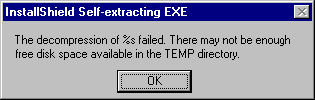
This error
message is mis-leading. You probably have plenty of disk
space. This message occurs if you had previously
installed, partially installed, or uninstalled the Castle
Infinity Demo. To correct the problem you need to:
- Run the Uninstaller for Castle Infinity Demo (If it doesn't exist, proceed to the next step).
- Go to your windows temp folder.
- For Windows 95 use MS Explorer (or MY COMPUTER) and go to c:/windows/temp/ or c:/win95/temp/
- For Windows NT 4.0, use Explorer and go to C:/temp/
- For Windows NT 3.51 use File Manager and go to C:/temp/
- In this folder, you will find one or both of these sub-folders: "shared" and "castle". You need to delete these two folders along with any files or sub-folders in them. (DO NOT delete your temp folder)
- Reinstall the product.